01 / A scenario run in SENTRIX
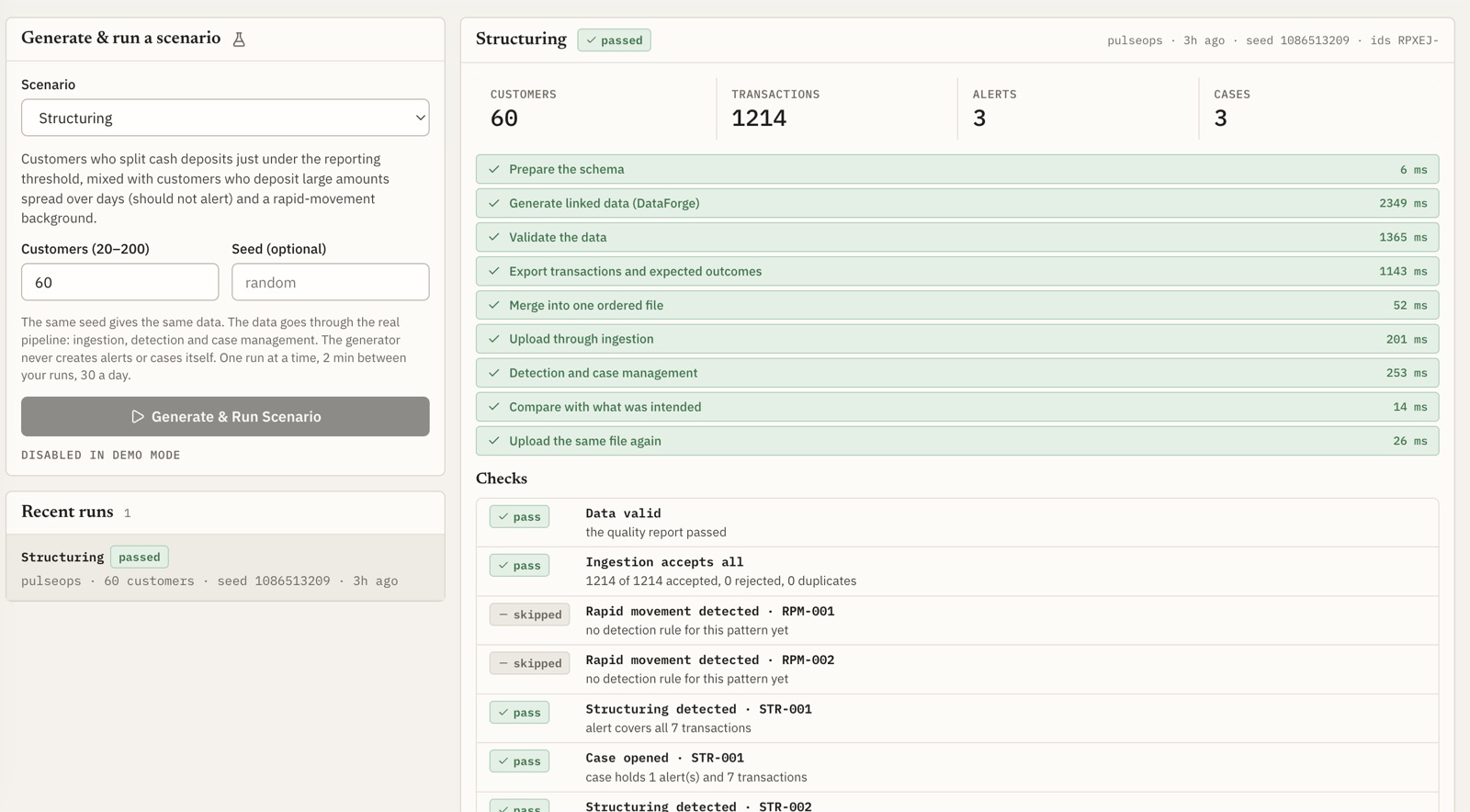
Pick a scenario, a customer count and an optional seed (the same seed gives the same data), and start the run. The screenshot is a finished Structuring run from the demo session, where starting new runs is disabled.
02 / How SENTRIX calls DataForge
The SENTRIX scenarios service runs the DataForge CLI as a child process: a fixed command, no shell, a time limit.
// per run
- Template the schema with a unique id prefix and recent dates
- Generate linked customers, accounts and transactions with the planted patterns and hard negatives
- Validate the data with DataForge's quality report
- Export transactions and expected outcomes, merged into one ordered file
// then the normal path
- Upload the file through ingestion, like any other batch
- Detect: rules raise explainable alerts, which become cases
- Compare the result with the planted outcomes; each check passes, fails or is skipped
- Upload again to prove the same file creates no duplicates
The generator never creates alerts or cases itself. The planted labels are assertions to compare against, not instructions.
See SENTRIX
The SENTRIX console has a read-only demo session: browse the cases this data produces, the rule explanation behind each alert and the audit trail. Nothing in it can be changed or run.